The whole thing,
start to finish.
Setting up takes about ten minutes once. After that a match night is three presses: load the squad, score the goals, save the match.
1. Create a club
Only the person running the club needs an account. Players never do.
- Create an account with an email and a password.
- On the dashboard, fill in New club: a club name and a watch PIN of six characters using 0-9 and A-F. Those are the only characters a Garmin can type without a keyboard, which is why the PIN looks the way it does.
- Save, and the club gets a room code — six characters, generated for you so two clubs can never end up with the same one.
The room code is the club's address; the PIN is what proves the watch belongs to it. Write both down. A forgotten PIN cannot be shown, only replaced — it is stored as a one-way hash, which is also why nobody can read it out of the database.
2. Install the watch app
Mini Soccer Lite — free
A fixed roster of seven a side, no internet, nothing to set up. Install this first if you have never scored from a wrist and want to feel it before paying.
Mini Soccer Pro
The one that connects to your club room: real names, live page, season table. Bought once in the Connect IQ store.
Install from the Connect IQ app on your phone. The watch picks it up on the next sync and it appears in the activity list, usually near the bottom.
3. Connect the watch to your club
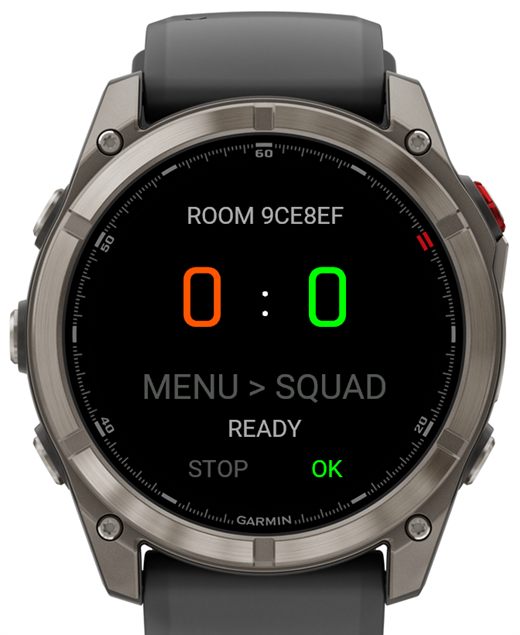
The first time Pro opens it asks for the room code, then the PIN.
- UP / DOWN change the character under the gold underline
- SELECT (start) moves to the next one
- BACK steps back a character
Six characters, then six more, and the watch remembers both. To change them later: BACK or hold UP to open the menu, then Room Code / PIN. The fields come pre-filled, so pressing SELECT six times keeps the code and lets you edit only the PIN.
4. Squad and bib colours
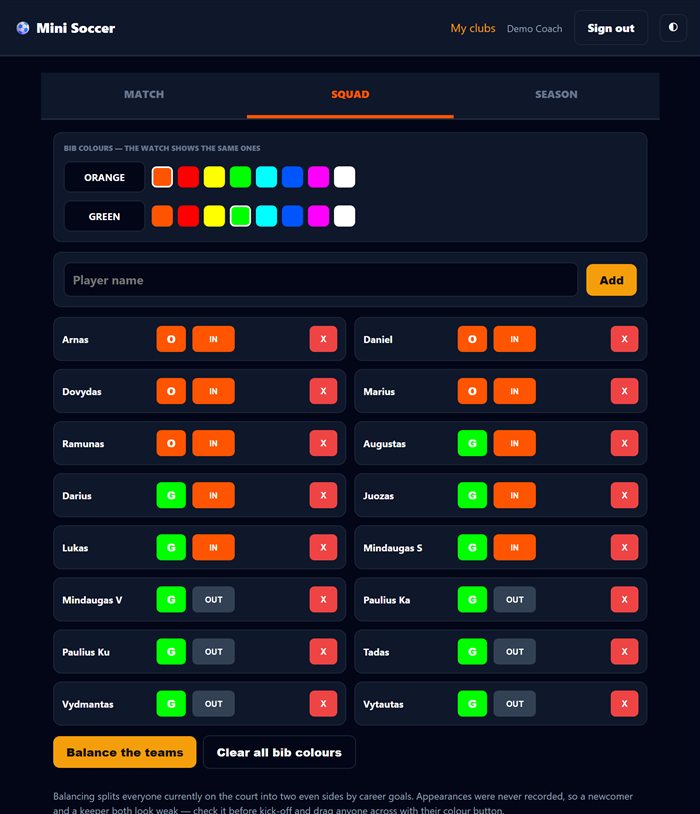
Open your club and go to Squad.
- Add a player by nickname. Use the name people shout on the pitch, never a full legal name — sign-up links are public to whoever holds them.
- The colour button cycles a player through orange, green and no bib at all. New players start with no bib.
- IN / OUT is who is on the court tonight. Only players who are IN and have a bib reach the watch.
- The two colour rows at the top set your club's actual bib colours. The watch paints the score in the same two.
Delete sits on the far right, well away from the buttons you press every week. It cannot be undone.
5. Who is playing this week
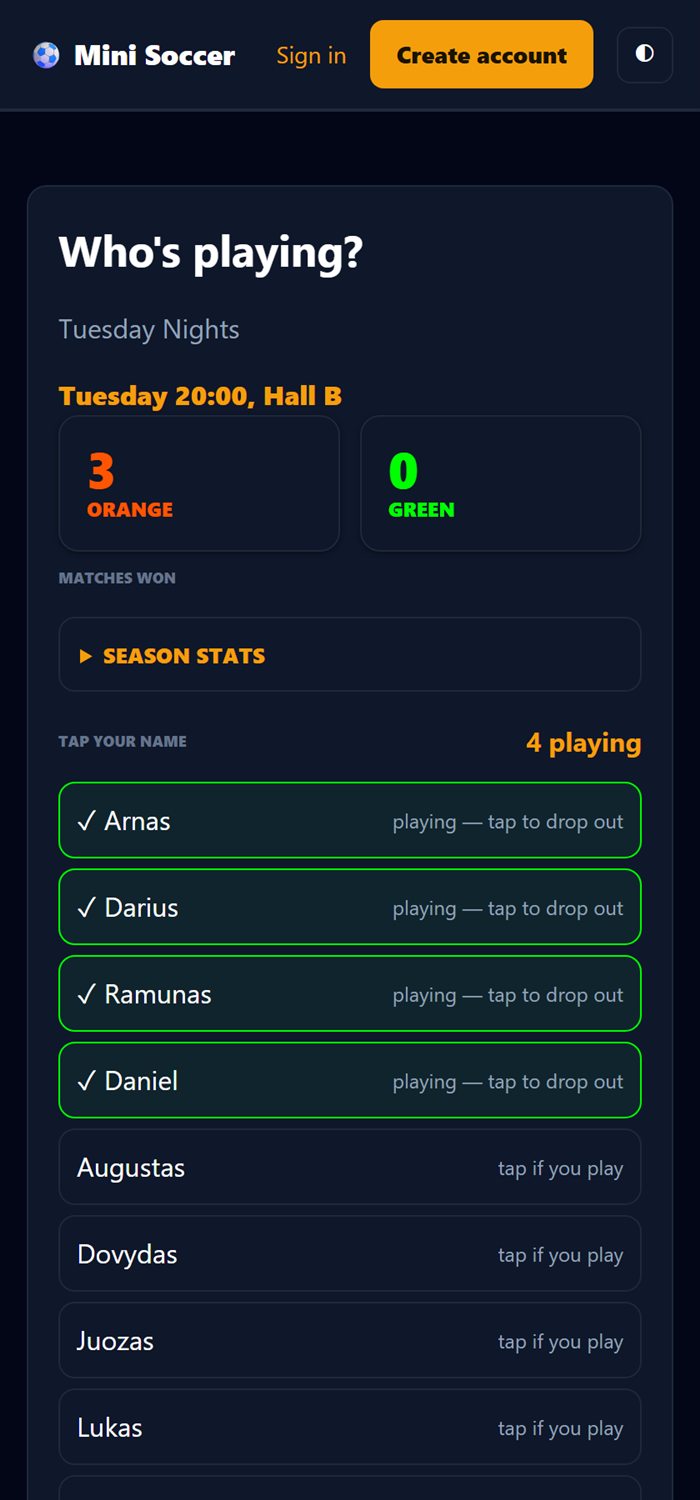
In Squad, set a line like Tuesday 20:00, Hall B, read the sign-up password — shown in plain text on purpose, because you read it out to the group — and press Share.
Your players open the link, type the password once, and tap their own name. Whoever answers first goes to the top, and the count shows at a glance how many you have. Nobody needs an account.
A name that is not in the squad can still add itself, but it waits: you get Approve and Reject buttons in the console. A public link cannot quietly fill your club with strangers.
The same page shows the season table, so players stop asking who is top scorer.
6. Match night
- Line-up from sign-ups in the console: everyone who signed up walks onto the court, everyone else sits down, the two sides come out even and the list clears.
- On the watch, menu → Load Squad. It pulls tonight's players and your bib colours. The status line shows how many arrived.
- Optionally menu → Start Recording for a real Garmin soccer activity with heart rate, and the final score plus the scorers written into the FIT file.
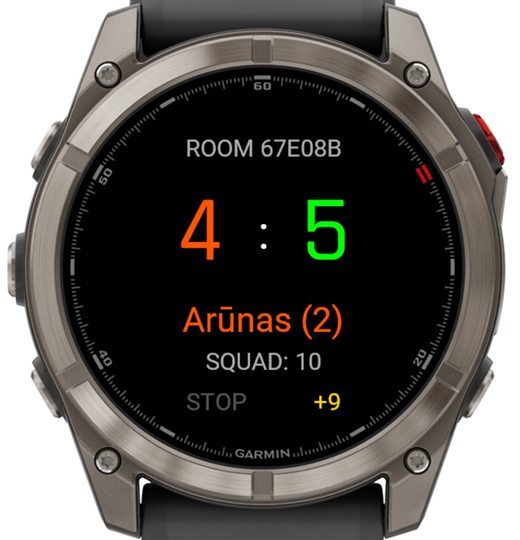
- UP / DOWN pick the scorer, SELECT records the goal. The counter beside the name is that player's tally for the match.
- Menu → Sync Goals pushes them to the page. The +9 in the corner is how many are still waiting.
Out of Bluetooth range nothing is lost: goals queue on the watch and go across the moment a phone with Garmin Connect is near again. Every goal carries its own id, so syncing the same batch twice never counts it twice.
7. Ending the match, and the season
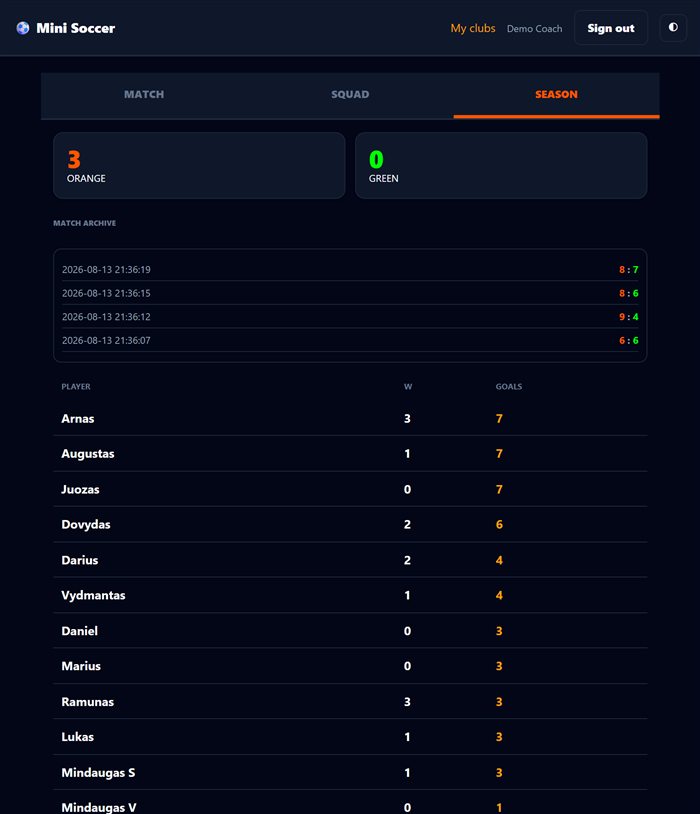
Save match in the console closes it: the result joins the archive, and every player picks up their goals — plus a win for whoever was on the winning side. The live match resets to 0:0 for next week.
Nothing is typed up afterwards. The Season tab is the whole record: matches won by each colour, an archive of results, and a table of players by goals.
Save only once per match. Until you do, goals can still be deleted from the log; afterwards they are part of the season.
8. When something is wrong
The watch says ERROR 403
The room code or the PIN does not match. Menu → Room Code / PIN and dial them in again. If you have forgotten the PIN, set a new one on the dashboard — it can be replaced but never displayed.
The watch says SQUAD EMPTY
Nobody is on the court with a bib. In Squad, set players to IN and give them a colour, or press Line-up from sign-ups. A player without a bib is deliberately left out — a goal has to belong to one side or the other.
Goals are not reaching the page
Syncing needs a phone with Garmin Connect nearby. Until then the corner counter keeps climbing and nothing is lost. Menu → Sync Goals once the phone is back.
The two team totals do not match the player cards
They always should. Anyone substituted off mid-match keeps their card, greyed out and marked out, precisely so the arithmetic stays visible.
Someone I do not know is on the sign-up list
They are waiting for approval and count for nothing until you press Approve. To stop it happening again, change the sign-up password in Squad — the old one dies instantly.
Another person needs to run the club too
On the dashboard, open Who else runs this club and give them the invite code. They create an account, paste it into Join a club, and they are in with the same rights. Only the owner can remove managers or rotate the code.
What the watch is telling you
Every message Mini Soccer can put on the watch screen, and what to do about it. The smaller line is what older installs printed before these messages had names.
| On the watch | What it means, and what to do |
|---|---|
| NO PHONE LINK
ERROR -104 / -2 |
The watch never reached the internet. It has no connection of its own — everything goes out through your phone. Open Garmin Connect on the phone and let it sync, then try again on the watch. If it keeps happening, allow Garmin Connect to run in the background: when the phone shuts it down to save battery, the watch loses its way out. |
| WRONG CODE/PIN
ERROR 403 |
The six characters do not match any room. Both the code and the PIN are shown at the top of your club page, and you can set a new PIN there if you have lost it. |
| ROOM NOT FOUND
ERROR 404 |
The code is the right shape but no room carries it any more — usually a club that has been deleted, or a code copied from somewhere else. |
| ERROR 500 | Something broke on our side, not yours. Nothing is lost: goals stay on the watch until they are sent, so wait a minute and sync again. |
| SET ROOM FIRST | The watch has no room stored yet. Hold the menu button, choose Room Code / PIN, and type in the six characters from your club page. |
| SQUAD EMPTY | The room answered, but nobody is marked as playing. Pick the squad on the club page first, then load it again on the watch. |
| SQUAD NEEDS PRO
SYNC NEEDS PRO |
You are running Mini Soccer Lite, which keeps score on the wrist and nothing else. Pro is the version that talks to your club. |
| NOTHING TO SYNC | Nothing is waiting — every goal has already reached the club page. |
Supported watches
Anything with Connect IQ 3 or newer, which is most Garmin watches sold since 2017 — 130 models in total.
fenix & epix
fenix 5, 5 Plus, 6, 7, 8, 9, fenix E, epix 2, epix Pro, enduro, enduro 3, MARQ and MARQ 2, Descent Mk1–Mk3, D2 series, quatix.
Forerunner
FR55, 70, 165, 170, 245, 255, 265, 570, 645, 745, 935, 945, 955, 965, 970.
Instinct
Instinct 2, 2S, 2X, Instinct 3 (AMOLED and Solar), Instinct E, Instinct Crossover.
venu & vívoactive
venu, venu 2, 2S, 2 Plus, venu 3, 3S, venu 4, venu Sq and Sq 2, venu X1, vívoactive 3, 4, 4S, 5, 6.
Not sure about yours? Open the Connect IQ store on your phone — it only shows apps your watch can run.
That is the whole system.
A club room is free and takes a minute.
Start a club — free No Garmin? Vote for a phone app